
티스토리 뷰
/lib/libc.so.6: version 'GLIBC_2.28' not found (required by /lib/libglib-2.0.so.0)
단순최고 2023. 5. 17. 08:36목차
1. 에러 메시지
2. GLIBC_2.28이란?
3. 디버깅
결론
libglib-2.0.so.0 파일 GLIBC 버전이 낮았기 때문
기존: libglib-2.0.so.0 -> libglib-2.0.so.0.6600.8
변경: libglib-2.0.so.0 -> liblib-2.0.so.0.7200.1
1. 에러 메시지
/lib 경로에 shared object 파일(libc.so.6)이 있는데 에러 발생

2. GLIBC_2.28이란?
glibc는 gcc c 라이브러리이다.
현재 guest OS의 glibc 버전이 낮다.
root@ubuntu:~# ldd --version
ldd (Ubuntu GLIBC 2.27-3ubuntu1.6) 2.27
Copyright (C) 2018 Free Software Foundation, Inc.
This is free software; see the source for copying conditions.  There is NO
warranty; not even for MERCHANTABILITY or FITNESS FOR A PARTICULAR PURPOSE.
Written by Roland McGrath and Ulrich Drepper.
3. 디버깅
guest OS를 Ubuntu 20 LTS로 변경
BSP 빌드에 필요한 패키지 설치
apt-get install make

apt-get install gcc

apt-get install m4

apt-get install libtinfo5

apt-get install libncurses5

apt-get install bison

apt-get install flex
bison: command not found
flex: command not found
Ubuntu 20 LTS 변경 후 GLIBC 버전 확인
root@ubuntu:/# ldd --version
ldd (Ubuntu GLIBC 2.31-0ubuntu9.9) 2.31
Copyright (C) 2020 Free Software Foundation, Inc.
This is free software; see the source for copying conditions.  There is NO
warranty; not even for MERCHANTABILITY or FITNESS FOR A PARTICULAR PURPOSE.
Written by Roland McGrath and Ulrich Drepper.
타겟보드에 shared object 세팅했으나 GLIBC 에러 발생
ccimx8xsbcpro:/data # ./Qcmbr
./Qcmbr: /lib/libc.so.6: version `GLIBC_2.28' not found (required by /lib/libglib-2.0.so.0)
libc.so.6 파일을 GLIBC_2.35 버전(Ubuntu 22 LTS 용) 다운로드 및 세팅
deb 파일에서 libc.so.6 파일하여 /usr/local/dea-9.0-r3/build/core/lib 경로에 복사
https://ubuntu.pkgs.org/22.04/ubuntu-main-arm64/libc6_2.35-0ubuntu3_arm64.deb.html
※ deb 파일 열기
https://simplebest.tistory.com/717
※ 에러
ckati failed with: signal: killed

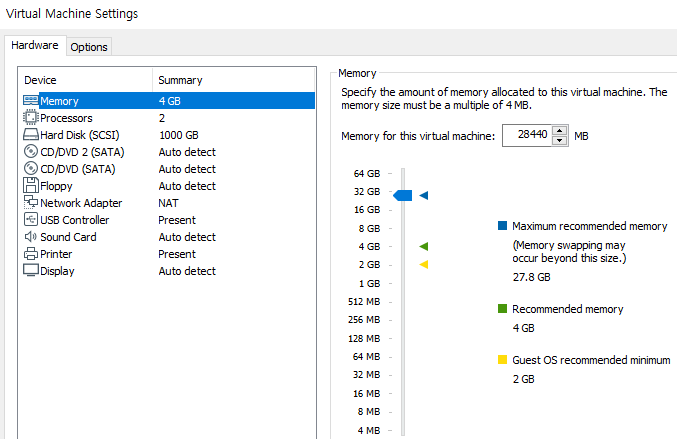
Ubuntu 20 LTS에서 dea-9.0-r3 소스 빌드 중 에러
원인: RAM 부족해서 빌드 종료
해결법: RAM 늘리기
https://stackoverflow.com/questions/64027042/aosp-building-failed-ckati-failed-with-exit-status-1
eror while loading shared libraries: libtinfo.so.5
prebuilts/clang/host/linux-x86/clang-4691093/bin/clang.real: error while loading shared libraries: libtinfo.so.5: cannot open shared object file: No such file or directory원인: 해당 shared object(shared library = so 파일) 파일 없기 때문
해결법: libtinfo.so.5 관련 패키지 설치
root@ubuntu:/# sudo apt-get install libtinfo5
repo: command not found
해결법: .bashrc 파일 실행
source ~/.bashrchttps://stackoverflow.com/questions/3682083/repo-command-not-found
./Qcmbr: relocation error: /lib/libpthread.so.0: symbol __libc_vfork version GLIBC_PRIVATE not defined in file libc.so.6 with link time reference
원인: libc.so.6이 libc-2.27.so의 symbolic link로 설정 안됐기 때문
해결법
ccimx8xsbcpro:/lib # ln -sf libc-2.27.so libc.so.6
ccimx8xsbcpro:/vendor/bin # ./Qcmbr
./Qcmbr: error while loading shared libraries: libm.so.6: cannot open shared object file: No such file or directory
원인: libm.so.6 파일 없어서 dynamic linking 할 수 없기 때문
해결법
libm.so.6
https://ubuntu.pkgs.org/22.04/ubuntu-main-arm64/libc6_2.35-0ubuntu3_arm64.deb.html
ccimx8xsbcpro:/vendor/bin # ./Qcmbr
./Qcmbr: /lib/libc.so.6: version `GLIBC_2.28' not found (required by /lib/libglib-2.0.so.0
./Qcmbr: /lib/libc.so.6: version `GLIBC_2.33' not found (required by /lib/libglib-2.0.so.0
./Qcmbr: /lib/libc.so.6: version `GLIBC_2.32' not found (required by /lib/libglib-2.0.so.0
./Qcmbr: /lib/libc.so.6: version `GLIBC_2.34' not found (required by /lib/libglib-2.0.so.0
원인: libc.so.6에 GLIBC_2.33, GLIBC_2.32, GLIBC_2.34가 없기 때문
root@ubuntu:/usr/local/dea-9.0-r3/build/core/lib# strings libc.so.6 | grep GLIBC
GLIBC_2.17
GLIBC_2.18
GLIBC_2.22
GLIBC_2.23
GLIBC_2.24
GLIBC_2.25
GLIBC_2.26
GLIBC_2.27
GLIBC_PRIVATE
GNU C Library (Ubuntu GLIBC 2.27-3ubuntu1.6) stable release version 2.27.
root@ubuntu:/usr/local/dea-9.0-r3/build/core/lib# strings libglib-2.0.so.0 | grep GLIBC
GLIBC_2.17
GLIBC_2.28
GLIBC_2.33
GLIBC_2.32
GLIBC_2.34
해결법
libglib-2.0.so.0.5600.1 파일의 GLIBC 버전이 libc.so.6의 GLIBC 버전보다 낮아야 한다.
https://ubuntu.pkgs.org/18.04/ubuntu-main-arm64/libglib2.0-0_2.56.1-2ubuntu1_arm64.deb.html
ccimx8xsbcpro:/lib # strings libc.so.6 | grep GLIBC
GLIBC_2.17
GLIBC_2.18
GLIBC_2.22
GLIBC_2.23
GLIBC_2.24
GLIBC_2.25
GLIBC_2.26
GLIBC_2.27
GLIBC_PRIVATE
GNU C Library (Ubuntu GLIBC 2.27-3ubuntu1.6) stable release version 2.27.


root@ubuntu:/server-root# strings libglib-2.0.so.0.5600.1 | grep GLIBC
GLIBC_2.17
ccimx8xsbcpro:/lib # ln- sf libc-2.27.so libc.so.6
ccimx8xsbcpro:/lib # ln- sf libglib-2.0.so.0.5600.1 libglib-2.0.so.0
ccimx8xsbcpro:/lib # ls -al
total 3684
drwxrwxrwx  2 root root     340 2023-05-20 09:11 .
drwxrwxrwt 20 root root     980 1970-01-01 00:00 ..
-rwxrwxrwx  1 root root  124784 1970-01-01 00:00 ld-2.27.so
lrwxrwxrwx  1 root root      10 1970-01-01 00:00 ld-linux-aarch64.so.1 -> ld-2.27.so
lrwxrwxrwx  1 root root      23 1970-01-01 00:00 libbluetooth.so.3 -> libbluetooth.so.3.18.16
-rwxrwxrwx  1 root root  140328 1970-01-01 00:00 libbluetooth.so.3.18.16
-rwxrwxrwx  1 root root 1341248 1970-01-01 00:00 libc-2.27.so
lrwxrwxrwx  1 root root      12 2023-05-20 08:42 libc.so.6 -> libc-2.27.so
lrwxrwxrwx  1 root root      23 2023-05-20 09:11 libglib-2.0.so.0 -> libglib-2.0.so.0.5600.1
-rwx------  1 root root 1039680 2023-05-20 09:11 libglib-2.0.so.0.5600.1
-rwxrwxrwx  1 root root  551064 2023-05-20 08:18 libm.so.6
lrwxrwxrwx  1 root root      17 1970-01-01 00:00 libpcre.so.3 -> libpcre.so.3.13.3
-rwxrwxrwx  1 root root  399240 1970-01-01 00:00 libpcre.so.3.13.3
-rwxrwxrwx  1 root root  134688 1970-01-01 00:00 libpthread-2.27.so
lrwxrwxrwx  1 root root      18 1970-01-01 00:00 libpthread.so.0 -> libpthread-2.27.so
-rwxrwxrwx  1 root root   27448 1970-01-01 00:00 librt-2.27.so
lrwxrwxrwx  1 root root      13 1970-01-01 00:00 librt.so.1 -> librt-2.27.so
Qcmbr, Btdiag 실행 결과
ccimx8xsbcpro:/vendor/bin # ./Qcmbr


130|ccimx8xsbcpro:/vendor/bin # ./Btdiag
Require at least 5 arguments.

Example of client mode, Btdiag usage:
- BT FTM mode for serial:
./Btdiag UDT=yes PORT=2390 IOType=SERIAL DEVICE=/dev/ttyUSB0 BAUDRATE=115200

- BT FTM mode for USB:
./Btdiag UDT=yes PORT=2390 IOType=USB DEVICE=hci0
※ 참고
보드 vendor사 안드로이드 소스 설치용 스크립트
Install Digi Embedded for Android | ConnectCore 8X
Regardless of your current version, you can only install the new Digi Embedded for Android 9.0-r3 using the source code installer. Follow the steps in Install Digi Embedded for Android to download the new version. Digi eventually will release hotfixes in t
www.digi.com
#!/bin/bash 관련
https://asung123456.tistory.com/34
Linux Shell #! /bin/bash #! /bin/sh 에 대한 고찰
보통 쉘스크립트에서 가장 첫줄에 오는 #! /bin/ 자리에 있는 shell 프로그램으로 밑 라인의 명령어를 실행한다고 일반적으로 알고 있습니다. 그런데 이 원리가 사실은 exec계열의 SystemCall을 사용한
asung123456.tistory.com
shared object linking 이슈 해결법
https://simplebest.tistory.com/717
glibc
https://en.wikipedia.org/wiki/Glibc
해결법
'안드로이드 BSP' 카테고리의 다른 글
| /system/bin/sh: No such file or directory (0) | 2023.05.12 |
|---|
- Total
- Today
- Yesterday
- BackTracking
- 퀵정렬
- 이분탐색
- 합병정렬
- SW Expert Academy
- 중복순열
- 정렬
- 재귀
- dfs
- 자릿수
- Set
- 알고리즘
- 스택
- 최대한 갈 수 있을 때 까지 이동
- BFS
- 특정 문자열
- binary search
- range-based for loop
- 십일조
- unordered_set
- Hal
- 중복결과배제
- 정수자료형
- 인접리스트
- C++
- 브루트포스
- deque
- 최대한 갈 수 있을 때까지 이동
- 크로스컴파일
- 특정 조건따라 이동
| 일 | 월 | 화 | 수 | 목 | 금 | 토 |
|---|---|---|---|---|---|---|
| 1 | 2 | 3 | 4 | 5 | 6 | |
| 7 | 8 | 9 | 10 | 11 | 12 | 13 |
| 14 | 15 | 16 | 17 | 18 | 19 | 20 |
| 21 | 22 | 23 | 24 | 25 | 26 | 27 |
| 28 | 29 | 30 |